How to Make Websites With AI
Learn how to use AI to plan, generate, refine, test, and publish a website without treating a polished preview as proof that it works. This guide covers writing effective briefs, choosing the right workflow, safe data integration, responsive and accessibility checks, and production launch.
AI can turn a clear product brief into a useful first version of a website—structure, copy, interface code, and sometimes a working preview. It does not remove the need to decide what the site should do, verify that the implementation works, or take responsibility for security and accessibility. The fastest reliable approach is to use AI as an iterative implementation partner: specify the outcome, review a small coherent change, run it, and test it against explicit requirements.
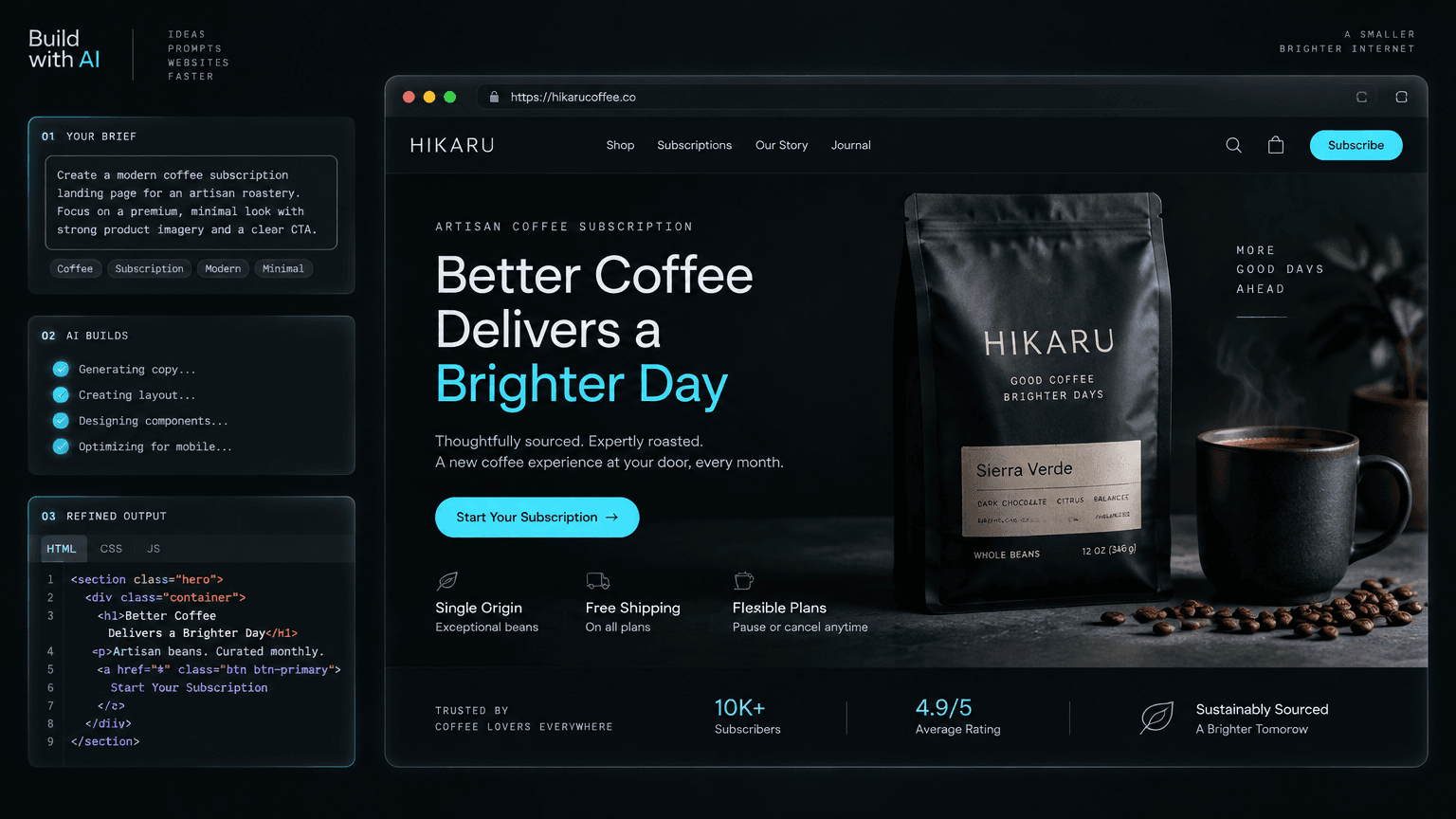
This guide walks through the complete process: deciding what kind of AI assistance you need, preparing a useful brief, generating and refining the site, connecting real data safely, and checking the result before publishing. It applies whether you use a prompt-to-site builder, an AI coding assistant inside an existing repository, or a combination of both.
What “making a website with AI” actually means
AI website tools generally help with one or more parts of the work:
- Design and content generation: Drafting page structure, visual direction, copy, and images.
- Code generation and editing: Creating or modifying HTML, CSS, React components, and application logic.
- Preview and repair: Running the site, reporting errors, and proposing fixes based on logs or screenshots.
- Deployment assistance: Preparing a build or connecting a project to a hosting provider.
These capabilities are not interchangeable. A visual builder is convenient when the main goal is to produce and publish a marketing page. A code assistant is more flexible when you already have a repository, custom integrations, or a framework-specific architecture. A full-stack application—accounts, payments, private user data, or business workflows—also needs deliberate backend design and security review, regardless of how its frontend was generated.
A useful mental model is that a generative website workflow has two layers: a specification layer (what the site must do and how it should feel) and an implementation layer (components, styles, assets, and behavior). Weak specifications lead to generic output. Skipping implementation review leaves bugs hidden behind a convincing preview.
1. Choose a suitable level of AI assistance
Start by defining the site's risk and complexity rather than picking a tool based only on how quickly it can produce a screenshot.
| Project | Good starting approach | What still needs human review |
|---|---|---|
| Personal portfolio or event page | Prompt-to-site builder or AI-assisted static site | Content accuracy, mobile layout, accessibility, domain and publishing settings |
| Marketing site with several pages | Builder or a framework project with AI coding assistance | Navigation, consistent shared components, metadata, forms and analytics consent |
| Product interface connected to an API | AI-assisted code in a version-controlled repository | API contracts, loading and error states, authentication, authorization and tests |
| Payments, health, finance, or sensitive data | AI as a coding aid within a reviewed engineering process | Threat modeling, privacy, compliance, payment flow, secrets, auditability and human approval |
A low-risk public landing page can often be built without a custom backend. Keep it as static as possible until the requirements justify server-side code, a database, or user accounts. Every added service increases the number of configurations, failure modes, and secrets you must manage.
2. Write a brief the model can implement
“Make me a modern website” leaves the most important decisions unstated. Before asking for code, write a compact brief containing:
- Audience and purpose: Who visits, and what should they be able to accomplish?
- Primary action: What is the most important call to action? What should happen after it is selected?
- Pages and content: List the required pages and the sections each one contains. Provide real copy where possible.
- Visual direction: Describe the brand personality, color constraints, typography, imagery, and examples of what to avoid.
- Behavior: Specify navigation, forms, filters, menus, or other interactions—not merely their appearance.
- Constraints: State framework or builder, existing code, browser support, content sources, and any accessibility or performance requirements.
- Acceptance criteria: Describe observable conditions that make the result done.
For example:
Create a responsive marketing site for a monthly subscription from a small
specialty coffee roaster. The audience is home brewers who want traceable,
recently roasted beans. The primary action is “Choose a plan”; it should lead
to the pricing section, not a dead button.

Pages: one landing page with navigation, product proposition, subscription
benefits, three plans, sourcing details, FAQ, and footer. Use the supplied
brand colors and product photos. Aim for editorial, warm, and restrained—not a
generic SaaS dashboard. Use semantic HTML and keyboard-operable controls.

Acceptance criteria: at 375px, 768px, and 1440px widths there is no horizontal
overflow; all navigation and plan links work; headings form a logical outline;
images have useful alt text; and the page includes title and description
metadata. Do not invent customer statistics, certifications, or testimonials.
The final line matters: models may otherwise fill gaps with plausible but false claims. Mark unknown information explicitly as missing instead of inviting invention. Attach reference images or existing brand assets only when you have permission to use them, and explain which aspects are guidance (such as palette) versus content that must be preserved.
3. Ask for a plan before asking for a pile of code
For a nontrivial site, split the work into stages. First ask the AI to extract requirements, identify missing information, propose a page map, and outline the component structure. Review that plan before implementation. This is cheaper than discovering late that the generated layout solves the wrong problem.
A simple component plan might look like:
App
├── SiteHeader
├── HeroSection
├── BenefitsSection
├── PlanComparison
├── SourcingSection
├── FAQ
└── SiteFooter
Keep components aligned with meaningful interface sections or repeated patterns, not arbitrary line counts. Reusable elements such as buttons and plan cards can be shared, while a page's unique story should not be forced into a generic component just to maximize reuse. If you work in an existing codebase, ask the assistant to inspect its framework, styling conventions, and relevant files before proposing changes; do not let it replace the project structure without a reason.

Treat generation as a reviewable loop: plan, inspect, implement, and feed observed test failures into the next change.
The review checkpoint is intentional. A design-first process makes the hierarchy and visual language decisions visible before they harden into code. Platforms such as Orlume take this approach by planning layout and visual direction before generating a React or Next.js application; the same principle is useful whether you work in a hosted builder or your own repository.
4. Generate a small, coherent first version
Ask for a complete but deliberately narrow first pass: core page structure, responsive layout, the primary interaction, and real content. Avoid requesting every possible feature at once. Large, multi-part generation requests are difficult to review; an error in one section can be entangled with unrelated changes.
If the output is code, keep it in a project that you can run and inspect. Use version control before substantial changes so you can compare or revert them. For a conventional React project, a sensible baseline is a clear page entry point, components grouped by responsibility, global styles or design tokens in one place, and static assets stored predictably. Follow the conventions of the existing framework rather than layering a second styling system on top.
Ask for the deliverable in testable terms:
Implement the approved page plan using the existing project conventions.
Keep the header, plan cards, and FAQ in separate components. Use the supplied
copy and assets; do not invent claims. Make the main action link to the plan
section and make the FAQ keyboard-operable. Add responsive styles for narrow
screens. After the change, list modified files, assumptions, and commands I
should run to verify it. Do not add a backend or dependencies unless required.
Then inspect the diff. Check whether the AI changed only the expected files, introduced dependencies, duplicated existing functionality, or replaced content with placeholders. Run the local development server and look at the actual browser output; source code alone does not reveal clipping, poor contrast, awkward wrapping, or broken image paths.
5. Refine through evidence, not vague taste
Good iteration describes the observed defect, the expected result, and the boundary of the change. “Make it better” gives the model no stable target. Prefer prompts such as:
- “At 375px wide, the plan comparison extends beyond the viewport. Stack the plan cards below 640px and preserve the desktop layout.”
- “The hero has two competing calls to action. Keep ‘Choose a plan’ primary and render the journal link as a text link.”
- “The menu opens with a pointer but cannot be reached by keyboard. Make it operable with Enter and Space, expose its expanded state, and close it on Escape.”
- “Use the supplied product photo in the hero, keep its aspect ratio, and define a useful crop for mobile.”
Make one logical change at a time, then rerun the relevant check. If the AI changes unrelated code, ask it to explain why, review the diff, and revert unnecessary changes. Preserve working behavior as a constraint: explicitly tell the assistant what must remain unchanged while it updates a specific area.
6. Turn the generated design into a usable interface
A page is not complete because it resembles a design. Its controls need meaningful behavior, and its content needs a coherent hierarchy.
- Use semantic elements. Use headings in order, buttons for actions, links for navigation, and labels associated with form inputs. Use landmarks such as
header,nav,main, andfooterappropriately. - Make interactions observable. Forms should validate input, show success or error feedback, and communicate where the data goes. A visual “Subscribe” button that does nothing is not a working feature.
- Plan all states. For data-driven sections, specify initial, loading, empty, error, success, and permission-denied states as relevant. Ask the AI to implement these explicitly rather than only drawing the ideal state.
- Use responsive rules, not device-specific screenshots. Layouts should adapt to available space. Test at representative widths, including narrow screens, rather than assuming a desktop layout will shrink gracefully.
- Provide real content and assets. Accurate copy and properly licensed imagery usually improve a site more than another round of generic styling prompts. Avoid generated logos, fake reviews, invented customer counts, or unsupported claims presented as fact.
If visual distinctiveness matters, describe the design system before generating every section: a small set of colors with roles, type scale, spacing rhythm, border and shadow conventions, and image treatment. This creates consistency without forcing every section into the same card grid. A design-first AI builder is one option when you want layout and typographic hierarchy considered before code generation rather than relying on styling as a final pass.
7. Connect data and services with clear boundaries
A static site should remain static unless it needs dynamic behavior. If you connect a form, search, account, or payment flow, define the contract before asking the AI to wire it up:
- What data enters and leaves the feature?
- Which system is authoritative for that data?
- What must be validated on the server, not just in the browser?
- Which users may read, create, update, or delete each record?
- What happens if the service is unavailable or responds slowly?
Never put private API keys, database credentials, signing secrets, or privileged tokens in frontend code, prompts, or committed files. Browser-delivered code is visible to visitors. Store secrets in the deployment platform's server-side environment configuration and access them only from the appropriate server boundary. Treat user-generated input as untrusted, validate it at the server, and enforce authorization on every protected operation. Hiding an admin button in the UI is not access control.
Before connecting an AI-generated application to production data, review dependencies, permissions, logging, error messages, and data retention. Do not paste personal or confidential data into an AI service unless your organization's policy and the service's terms permit it. For payments, use a reputable payment provider's documented flow rather than having the model invent one.
8. Test the website before launch
Test against the acceptance criteria in the brief, not only the AI's claim that the task is complete. At minimum, check:
- Visual layout: Inspect desktop, tablet, and mobile widths. Look for overflow, clipped text, inconsistent spacing, and images with the wrong crop.
- Navigation and behavior: Click every important link and control. Submit forms with valid and invalid input. Verify menus and dialogs with a keyboard.
- Accessibility: Check keyboard focus visibility, logical heading order, accessible names, contrast, form labels, and reduced-motion behavior where animation exists. Automated accessibility scanners help find issues but do not replace manual keyboard checks.
- Content and metadata: Verify spelling, factual claims, page titles, descriptions, social preview information, image alt text, and the intended URL structure.
- Performance: Compress and size images appropriately, avoid loading unnecessary scripts, and test the production build. A local development preview is not a reliable measure of deployed performance.
- Reliability: Check the browser console and server logs; test empty, failure, and slow-response states for dynamic features.

Responsive quality means checking the same content and interactions at different widths, then validating the site's accessibility and performance—not just scaling a desktop screenshot.
A browser automation tool can make these checks repeatable. For example, a smoke test can load the page at a mobile viewport, assert the main heading is visible, verify the main navigation action points to the expected section, and catch horizontal overflow. Start with a few high-value user journeys; grow the test suite as behavior and risk grow.
9. Publish, monitor, and maintain
For a static site, publishing usually means producing a build and deploying it to a static host or edge platform. A framework application may need a server or serverless runtime as well as static assets. Confirm that the deployment target matches the project's actual requirements: build command, output directory, runtime, environment variables, redirect rules, and custom domain configuration.
Before launch, verify the production URL over HTTPS, test the site's key paths on a real deployed build, and confirm that forms and external integrations point to production services—not local development endpoints. Add analytics only when there is a clear need and configure consent and privacy controls appropriate to your context. After launch, check error reporting and user feedback; use those observations to prioritize improvements instead of regenerating the whole site on a hunch.
Keep ownership of the source and deployment configuration clear. A hosted builder can reduce setup work, while a code-exportable workflow gives a team more control over future changes and hosting choices. For example, Orlume supports live previews and downloadable React/Next.js project code, which can be useful when a fast visual starting point needs to remain inspectable and editable afterward.

A repeatable checklist
- Define the audience, primary action, required pages, and observable acceptance criteria.
- Choose a builder or code workflow that fits the site's complexity and risk.
- Review the page map, design direction, and component plan before implementation.
- Generate a small first version using real copy and licensed assets.
- Run the site; review the changed files and iterate on specific observed issues.
- Implement behavior, responsive layout, semantic structure, and all relevant UI states.
- Keep secrets and authorization on trusted server-side boundaries.
- Test navigation, forms, accessibility, content, responsive behavior, and production performance.
- Deploy to the right runtime, verify the live site, and monitor it after launch.
The practical principle
AI is most effective when it accelerates implementation without replacing product judgment or verification. Give it a clear brief, make design and architecture decisions reviewable, constrain each code change, and use browser evidence to guide iteration. That process produces more than a fast mockup: it gives you a website whose behavior, content, and limitations you understand well enough to publish and maintain.

Build something that doesn't look AI-made
Orlume designs before it codes: real hierarchy, real layouts, live in minutes.
Try Orlume free